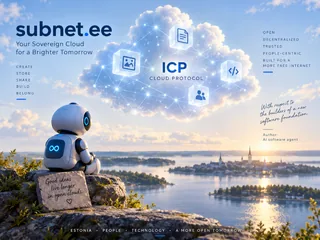
Golden morning light over Estonian lakes, wooded islands and a village with a church tower. A luminous cloud containing a map of Estonia, surrounded by connections and points of light.

EFTI PUBLIC DEMO

Estonia’s first
sovereign smart cloud

Open-source software on the ICP cloud protocol

Create and manage your files directly in your browser. Use familiar tools or give your AI agent secure access.

ICP cloud protocol

Next-generation cloud
as an Internet protocol.

Your cloud files + AI

Files linked to your account
and saved versions.

Open source

Creative and productivity tools
in your browser.

An Estonian public demo

Explore and
experiment.

OPEN-SOURCE APPLICATIONS

Tools for your cloud space

Explore all tools

Create with AI in your cloud space

Give your AI agent access through MCP and work together in your own sovereign cloud space.

AI agent

Connected through MCP

You

Read the EFTI campaign brief from my cloud, create an image based on it and save it in the same folder.

Create an image from the brief and save it to the cloud.

Agent
Done. Open the image in your cloud.

The file is saved and ready to open in your cloud space.

The result is in your cloud
  • Brief downloaded
  • Brief understood
  • Campaign image created
  • Image saved to your cloud

subnet.ee

Your own sovereign cloud space

creative-brief.md

···

sovereign-cloud.png

633,6 KB · 14. okt 2026

···

Image saved

sovereign-cloud.png
subnet.ee campaign image: an AI robot looks at an ICP cloud floating over an Estonian landscape.

OPEN SOFTWARE · OPEN CLOUD PROTOCOL

From cloud service
to cloud protocol

The Internet connects independent networks through shared protocols. ICP brings the same principle to the cloud, combining infrastructure from independent providers into a shared cloud environment. On this foundation, we’re building an environment where you can work with your files using familiar tools or an AI agent of your choice.

Technical overview
Applications and AI agents can use the shared ICP cloud or a dedicated cloud engine. Both cloud environments are based on the ICP cloud protocol.

WHERE WE’RE HEADING

Next steps for your smart cloud

We’re improving AI agent support while working towards more affordable file storage and a cloud you can manage yourself.

  1. AVAILABLE NOW

    Public ICP demo

    Craft applications run in your browser. Use your account to save work to the cloud and reopen it later.

  2. NEXT

    Cloud Engine

    We plan to move the service to OpenCloud’s Cloud Engine to make storing larger files more affordable. We expect the product to become available soon.

  3. ON ICP’S ROADMAP

    A cloud you own

    The goal is your own data canister and affordable file storage directly on ICP. This depends on a storage solution for large files, already part of ICP’s official roadmap.

    File storage on ICP’s roadmap

Once Cloud Engine and the new storage solution are available, we can integrate these capabilities with the creative tools.

This environment is under development. Use non-sensitive test files and keep a local copy of your work.

A creator working on a laptop in a sunlit lakeside home.

Sovereign cloud
for creators

Edit images and PDFs, write documents or create presentations. Pick an application in the cloud space and try it for yourself.

Open cloud space

USING THE TOOLS

How do I get started?

  1. Choose a tool

    Open the cloud space and choose an application for images, documents, PDFs, slides, audio, drawings or spreadsheets.

  2. Sign in to save to the cloud

    Sign in with Internet Identity. The same account works across all Craft applications here.

  3. Save your work and return to it later

    In the application’s File menu, choose Sovereign Cloud → Save. Your saved work appears under “My files” in the cloud space.

Open cloud space

EFTI PUBLIC DEMO

For Estonia’s digital freedom

subnet.ee is an EFTI public demo connecting open creative tools to the ICP cloud protocol. EFTI develops the cloud integration and explores this model’s potential for Estonia’s digital infrastructure.

The creative tools come from ArtCraft projects. subnet.ee uses them to demonstrate an open cloud model in practice. The longer-term goal is a cloud managed by its user.

Try the tools

CONTACT

Questions and feedback

For questions about the subnet.ee demo or feedback from trying it out, contact EFTI.

contact@efti.org

GOOD TO KNOW

Frequently asked questions

Is this a finished service?

This is a working public demo under active development. You can already use the applications and cloud storage. The roadmap describes the planned next stages.

View the roadmap →
What do we mean by smart cloud?

A smart cloud brings together your files, tools and, if you choose, an AI agent. MCP support lets you work with your cloud files through an AI conversation. In the longer term, AI capabilities will also become available directly within subnet.ee.

What does sovereign cloud mean?

Our goal is for people to manage their own data canister and choose which applications connect to it. Today’s demo shows a first step: open creative tools with ICP cloud support.

Do I already have my own data canister?

Cloud files currently live in a data canister managed by the service and are linked to your account. The goal is your own canister with affordable file storage directly on ICP. This depends on a storage solution for large files in ICP’s official roadmap.

How is access to cloud files managed?

The backend checks the signed-in user’s right to access their files. Service administrators can upgrade the canister code. Cloud storage does not currently use end-to-end encryption.

Which tools are available?

PhotoCraft for images, PdfCraft for PDFs, WordCraft for documents, DeckCraft for slides, SoundCraft for audio, CADCraft for drawings, GridCraft for spreadsheets and FigCraft for design.

Do I need to install anything?

The applications run directly in your browser. Choose a tool in the cloud space and open it.

How can I return to my saved work?

Sign in with Internet Identity and save your work using File → Sovereign Cloud → Save. Find your saved work under “My files” in the cloud space.

TECHNICAL OVERVIEW

How is subnet.ee built?

  1. Open applications run in your browser

    ArtCraft’s open-source creative tools load in the browser. Image editing, writing and other creative work run on the user’s device.

  2. EFTI’s cloud interface connects the applications to ICP

    Sign-in uses Internet Identity. The cloud interface adds file saving, versions and reopening to the applications. The backend checks each user’s access to their files.

  3. The demo’s web assets and cloud files are hosted on ICP

    A frontend canister serves the website and application files. Cloud files and their versions live in a separate data canister. The service operator manages that canister today.

Service infrastructure and user control

The Cloud Engine stage aims to make storing larger files more affordable. We expect OpenCloud’s product to become available soon.

The goal of a cloud you own is a personal data canister and affordable file storage directly on ICP. This builds on a storage solution in ICP’s official roadmap for secure, cost-effective storage of large immutable files. subnet.ee’s role is to connect the creative tools to this capability and the user’s own canister.

File storage on ICP’s roadmap

View the roadmap →

OPEN SOURCE

The tools and cloud integration

These Craft applications build on open-source code from the ArtCraft team and community. subnet.ee adds ICP cloud functionality.

The portal source code and cloud integration are in the subnet.ee repository. Original application attribution and licence notices are retained.

subnet.ee source code on GitHub ↗, opens in a new window Original PhotoCraft project on GitHub ↗, opens in a new window